How AI verification works
AI verification checks each new submission for you. It opens the review or post, reads who wrote it, the rating, the date, and the text, compares that with the person who submitted it and their screenshot, and gives a score out of 100. Clear passes and clear fails are settled on their own, so you only spend time on the unclear ones.
Only your team sees the AI check. Customers who submit proof never see a score or a verification step.
When the check runs
The check is scheduled automatically when a submission arrives. You don’t need to start it.
It does not run instantly. A short waiting period comes first, and some review sites moderate reviews before they publish them. This also stops someone from posting a review, collecting the reward, and deleting it. The proof has to still be live when the AI checks it.
While it waits or runs, the submission is in the Checking tab with the status Needs review · AI checking. You can still decide on it yourself. See Review and approve submissions.
If AI verification is off for the workspace or the campaign, submissions skip the check and go straight to Need action with AI not run.
What the AI checks
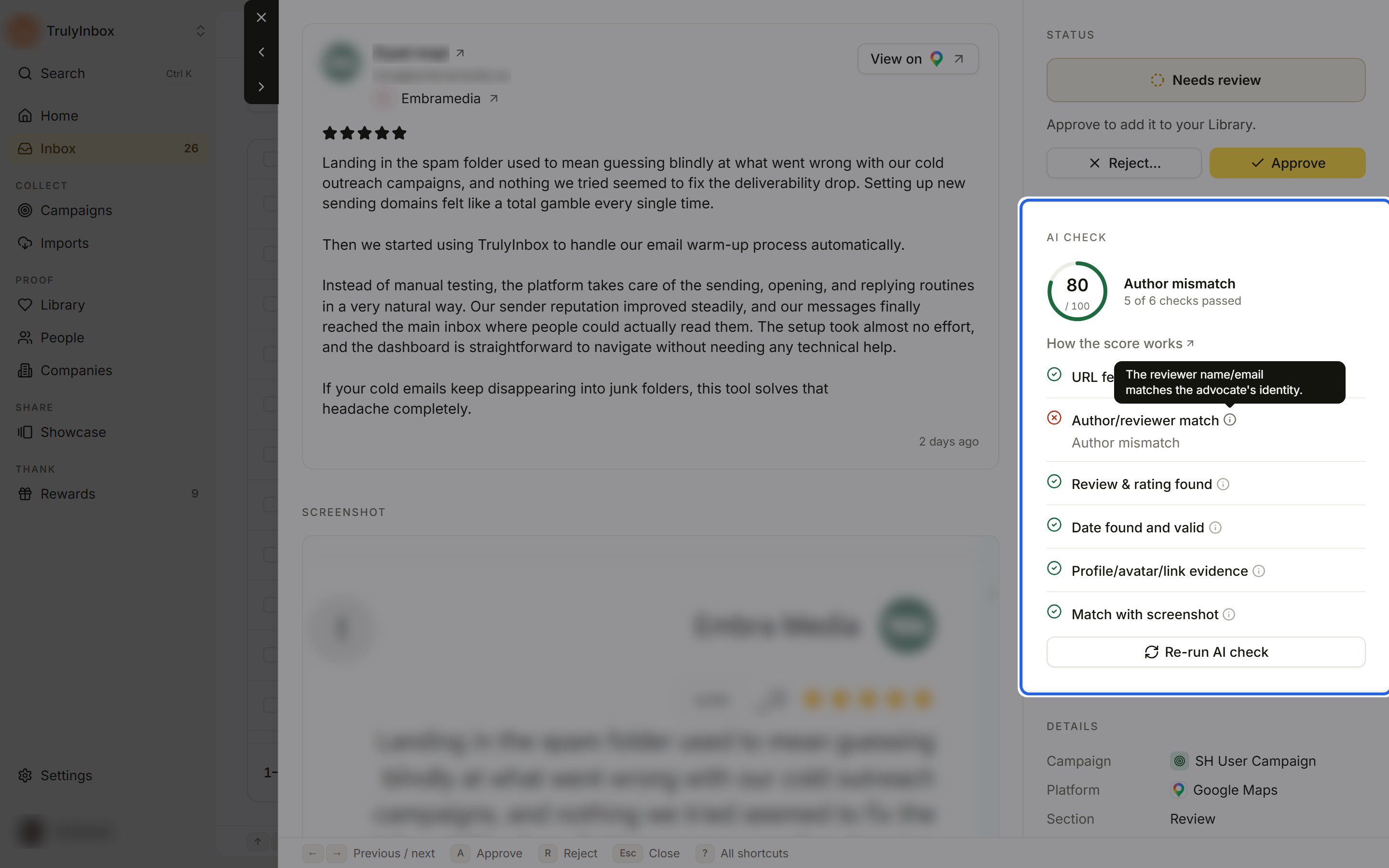
The checks you see in the drawer’s AI check section:
| Check | What it confirms |
|---|---|
| URL fetch successful | The review or post link opened, and the page works. |
| Author/reviewer match | The name on the review matches the person who submitted it. |
| Review & rating found | The review text and star rating are on the page. |
| Date found and valid | The page shows a post date, and it is valid. |
| Profile/avatar/link evidence | The reviewer’s profile, photo, or link shows who they are. |
| Match with screenshot | The screenshot shows the same thing as the live page. |
Social posts use Post text found instead of the review and rating check, and add Product/company mention found, which checks that the post mentions your product or company.
How the score is built
The score is a total out of 100. Each check is worth a set number of points. A passed check earns all of them, a partial match earns some, and a failed check earns none.
Review sites:
| Check | Points |
|---|---|
| URL fetch successful | 20 |
| Author/reviewer match | 20 |
| Review & rating found | 10 |
| Date found and valid | 20 |
| Profile/avatar/link evidence | 10 |
| Match with screenshot | 20 |
Social posts:
| Check | Points |
|---|---|
| URL fetch successful | 20 |
| Author/reviewer match | 10 |
| Post text found | 5 |
| Date found and valid | 20 |
| Product/company mention found | 20 |
| Profile/avatar/link evidence | 5 |
| Match with screenshot | 20 |
GetApp and Software Advice do not show a public link to the review, so customers send a screenshot only. For these two, the AI scores the screenshot alone, looking for the reviewer name, the rating, and the date.
What the score means
- High scores are approved automatically.
- Scores in the middle come to you for review, with the reason “Score is below your auto-approve score”.
- Low scores are rejected automatically.
You see the score and the reason on each submission. You can always overrule the AI by approving or rejecting yourself.
Why a high score can still come to you
After scoring, a few safety checks can send a submission to you even when the number looks good. The status line in the Inbox shows the reason:
- Author name doesn’t match: the name on the review is different from the person who submitted it.
- Your product isn’t mentioned: a social post never mentions your product or company. Social posts can’t be approved automatically without a mention.
- Link and screenshot don’t match: the link and the screenshot disagree on the author, rating, or text.
- The page was hard to read: the page was unclear, private, or needed a login.
When the link and the screenshot clearly disagree, the AI can reject the submission outright, even with a high score.
Pages that are not live yet
Some review sites hold a review for moderation before it goes public, so a valid link can show “not found” for a while. The AI does not reject these for being slow. The submission stays in Checking with the reason “The page isn’t live yet”, and the AI tries again later. If you don’t want to wait, open the submission and decide yourself, or click Run AI check.
Links that were already submitted
The AI also checks whether a link was sent before:
- If someone else already submitted the same link, the new submission is rejected with the reason “Someone already submitted this link” (Already claimed).
- If the same person sends the same link again, it is treated as a duplicate.
Read the result
In the drawer’s AI check section you see:
- The score ring, for example 80 / 100.
- A headline: Passed, Flagged, or the specific issue, such as Author mismatch.
- “N of M checks passed”, then each check with a pass, warning, or fail mark. A failed check shows why under its name. Hover the info icon for what the check means.
- Re-run AI check to score it again.
Who decided is shown under Decided by and in History: AI for the AI check, or your teammate’s name.