Import reviews from G2, Trustpilot, and other sites
Use this to bring in reviews you already have on a review site, or testimonials published on a web page. You paste a link, HighAdvocacy fetches what is there, and you choose what to keep.
For LinkedIn and X posts, see Import LinkedIn and X posts.
Before you start
- The link must be public. HighAdvocacy reads what a logged-out visitor sees.
- Supported review sites: G2, Capterra, Trustpilot, TrustRadius, Google Maps, and Chrome Web Store. Any other public web page counts as a Website source.
| Source | What to paste |
|---|---|
| G2, Capterra, TrustRadius | Your product’s review profile |
| Trustpilot | Your company’s review page |
| Google Maps | Your business listing. Short links from g.page, maps.app.goo.gl, and share.google also work |
| Chrome Web Store | Your extension’s listing |
| Website | Any public page that shows testimonials, such as https://example.com/customer-stories |
Paste a link
- Open Collect › Imports.
- Paste the link into the Paste a review page link… field. A badge shows what HighAdvocacy detected, for example G2 profile or Web page.
- For a review profile, turn on Check for new reviews every week if you want new reviews imported automatically, and pick a minimum rating. See Keep a profile in sync.
- Click Fetch reviews.
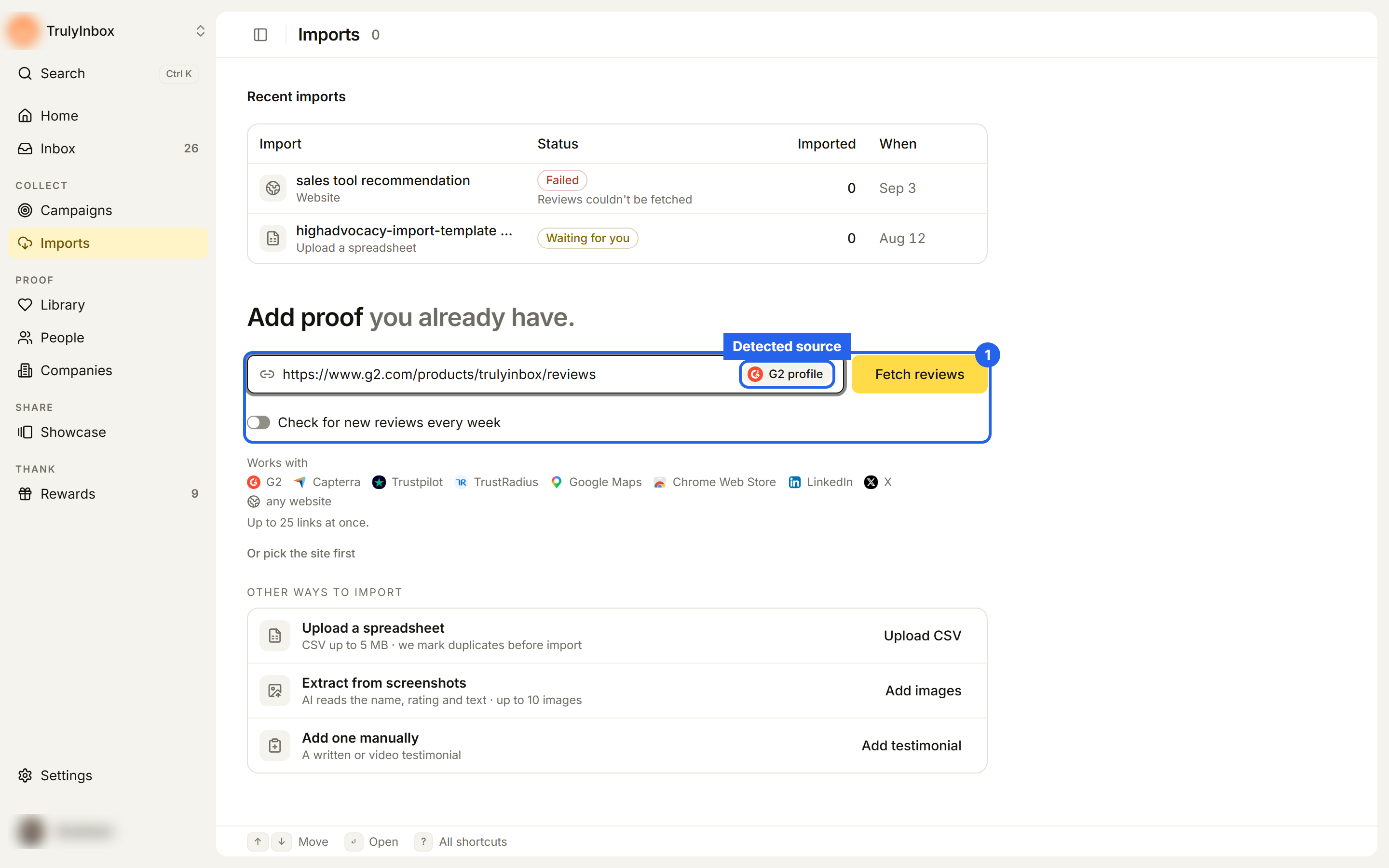
You can paste up to 25 website links at once. Review profiles go one at a time: paste one profile link per import.
Or pick the site first
If you prefer to choose the platform before pasting:
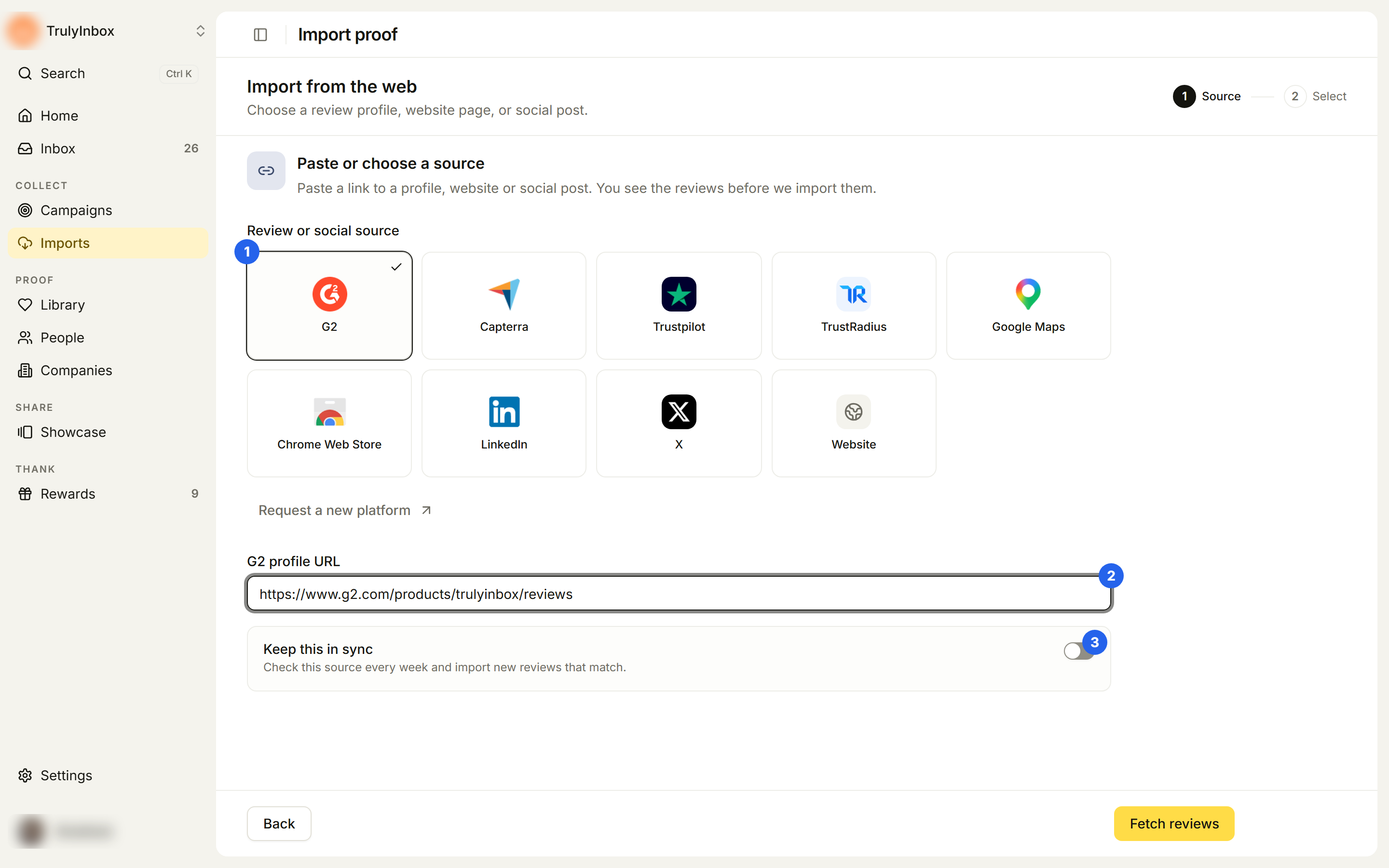
- On Imports, click Or pick the site first. The Import from the web page opens.
- Under Review or social source, choose a platform.
- Paste the link into the field that appears, for example G2 profile URL. If you saved this profile in Settings › Profile under Where you’re reviewed, the field is filled in for you. For Website, use Website URLs and add up to 25 links, separated by commas or new lines.
- Optional: turn on Keep this in sync.
- Click Fetch reviews.
If your site isn’t listed, click Request a new platform and tell us which one you need.
Keep a profile in sync
Review profiles can be checked every week. The switch is called Check for new reviews every week on the Imports page and Keep this in sync on the picker page (“Check this source every week and import new reviews that match.”).
When you turn it on, choose a Minimum rating:
- 5 stars only
- 4 stars and up (default)
- 3 stars and up
- 2 stars and up
- 1 star and up
The rule applies on each weekly check. New reviews that meet it are imported without a Select step. Website pages cannot be synced.
Synced profiles appear under Syncing sources on Imports and on Connected sources, where you can change the rule later.
While the reviews are fetched
You land on a progress page headed Import in progress. It usually takes a minute or two. You can leave the page; the import keeps going and you will find it under Recent imports with the status Waiting for you when it is ready.
Select and import
When the fetch finishes, the page shows Import from the platform and how many reviews were fetched. Then:
- Select the reviews you want. Use Search reviewer or text…, the rating filter, or the date filter (Any date, Last 30 days, Last 90 days, Last year) to narrow the list.
- Click Continue.
- On Confirm, add tags and optional AI hooks and highlights.
- Click Import N.
Reviews marked Duplicate are already in your workspace and can’t be selected. If you selected reviews rated 2 stars or lower, HighAdvocacy asks whether to include them. Details are in Review and confirm an import.
Troubleshooting
“Enter a valid g2.com URL.” (or another site’s domain) On the picker page, the link does not match the platform you picked. Paste the profile link from that site, or pick the right platform.
“Enter a full link that starts with https://.” or “That doesn’t look like a link yet. Paste the full page address.”
Paste the whole address, including https://.
“Paste up to 25 links at once.” Split your links across several imports.
“Paste one G2 profile at a time.” Review profiles import one per run. Paste a single profile link.
“Paste links from one source at a time. Website pages can go together.” You mixed a review site or social link with website links. Import them separately.
“Reddit links can’t be imported yet.” (also Facebook, Instagram, YouTube, TikTok, Threads) These sites are not supported. Use a screenshot instead: Extract from screenshots.
No reviews found “We found no reviews to import on this profile.” Check that the link opens the public review page, then click Choose another source.
No reviews can be imported “Every fetched review was a duplicate or had no reviewer name.” The reviews are already in your workspace, or have no reviewer name to import them under. Nothing was changed.
We couldn’t get your reviews “The review site had a problem. Try again in a few minutes.” Click Try again later.
Related
- Review and confirm an import
- Connected sources
- Duplicates and matching
- Settings: workspace profile: save your review site links