
Your customer replies to a testimonial request. The next morning, your email tool sends them another reminder. Marketing has the response; the sender still thinks nobody answered.
Automated testimonial collection needs a shared request status, a clear stop rule and a separate permission check before anyone publishes. Connect those handoffs before adding more triggers.
Use the completed setup below to decide what your sender, collection form and reviewer each own. For the messages and editing process, keep our manual testimonial-collection guide beside you.
Give each handoff an owner
Keep the original customer response, the approved wording and the allowed use together. A team approval and a customer's permission answer different questions.
| Building block | Owner | Check before moving on |
|---|---|---|
| Trigger and eligibility | Your product or CRM | The person used the workflow and can describe it; no overlapping request is open. |
| Request and reminders | Your sender | One request record exists; a response, decline or opt-out stops further reminders. |
| Words and permission | Customer marketer | The customer approved the wording, attribution and intended use. |
| Storage and publication | Library or page owner | The asset includes its source and permission record; the published version matches them. |
Choose a product event your team can explain, such as completing a rollout. A private customer comment can also start a conversation about an owned testimonial. Never treat an NPS answer as words the customer has agreed to publish.
Public-review campaigns need their own eligibility rules. G2's Community Guidelines, checked October 28, prohibit collecting only positive reviews or excluding potentially negative reviewers. Do not carry a positive-NPS filter from a testimonial workflow into a G2 invitation.
Start with this completed configuration
This is an illustrative design for a written testimonial about rollout. The field names are proposed records for your team to implement, not a vendor API or a tested customer campaign.
Purpose: answer a buyer's question about rolling out to a team
Trigger: rollout_completed, recorded by the product
Contact: sample-contact-042
Request key: sample-contact-042:rollout-story
Request owner: customer marketing
Sender: the team's existing email workflow
Collection destination: a written-testimonial campaign link
Initial state: requested
Before sending: check opt-out, open requests and recent asks
Reminder: one follow-up after a date the request owner chooses
Stop reminders: response received, declined or opted out
After a response: state = awaiting wording and permission review
Proposed use: website rollout page, named quote
Other uses: ask separately before adding a logo or paid-ad use
Publication owner: website editor
Publish only: approved wording + recorded permission for this use
Use a stable request key across retries. Before sending, check whether that request already exists. Ask whoever connects the systems to prevent two simultaneous events from creating two sends; a spreadsheet lookup alone may not do that.
The form submission must update the sender's record. If your tools cannot pass that update reliably, have the request owner reconcile responses before releasing reminders. Keep that handoff manual until it works.
Follow the same sample request through to a published quote. These illustrative records describe what your implementer must enforce.
| Event | Record or decision |
|---|---|
| First rollout event | Record sample-contact-042:rollout-story; mark the request sent. |
| Repeat event | Find that existing key; create no second request or send. |
| Customer replies by email | Save reply-042 as the original; stop reminders and queue wording review. |
| Marketer proposes the edit | Link quote-v2 to reply-042; keep publication pending. |
| Customer approves the website use | Save approval-042 for quote-v2, named attribution and the rollout page. Logo and paid-ad use remain unapproved. |
| Website editor publishes | Log the rollout-page placement and quote-v2 beside approval-042. A later ad request starts a separate approval. |
HubSpot documents separate enrollment, re-enrollment and unenrollment settings. Its full workflow editor requires a qualifying Professional or Enterprise subscription, and available actions depend on the plan. Check those settings in your actual sender rather than assuming a trigger includes a stopping rule.
Send a request the customer can answer
Rollout testimonial request
Subject: Could we share your rollout experience?
Hi [First Name],
Your team completed [verified rollout milestone]. Would you be open to describing how the rollout went?
What changed for the people using [Product], and what would you tell another team considering it?
You can reply here or use [testimonial link]. We would like a quote for [specific website page]. I will send the final wording and attribution for your approval before publishing it there. It is fine to decline.
Thanks,
[Your Name]
Replace every [bracketed] field before sending.
Replace the milestone only with something you checked. If you edit an existing comment, keep its source and meaning. A testimonial template can structure the question; it cannot supply an experience the customer never had. For a recording, use the questions and setup checks in our video testimonials guide.
Choose how requests reach the collection form
If you already use Senja, its automated-request documentation, checked October 28, gives a concrete setup: open a form, choose Invites → Automate, then a supported platform. The feature requires Starter or Pro. Its configured email sequence supplies follow-ups, and submitting a testimonial stops scheduled reminders. That statement does not establish how duplicate trigger events are handled; test them separately.
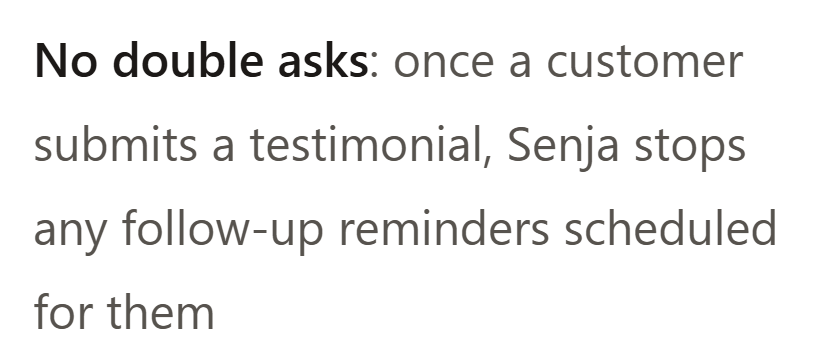
Source: Senja Help, captured October 28, 2026. This is the published documentation, not a test in a customer account.
HighAdvocacy gives you a campaign for written or video testimonials, an Inbox for submission decisions and a Library for approved material. In the campaign builder, select the testimonial ask and set the question. Then share the hosted link or install the widget.
Your sender can deliver the hosted link. For a popup, your application code calls HighAdvocacy.open(); copying the widget code alone does not create a CRM-event trigger. Have the person wiring the event verify who sees the request and how a response gets back to the sender.
On a live campaign, Copy link in the header gives you the hosted page for your sender.
Source: HighAdvocacy's sharing guide. Crop of its existing interface screenshot, reviewed October 28, 2026; the original capture date is unknown.
Carry the answer through permission and publication
When an answer arrives, stop request reminders and save the customer's original words. Mark the next task as a review, so a teammate does not mistake a reply for a ready-to-publish quote.
Send back the proposed wording with the name, role, company and destination you intend to show. Record which version the customer approved and where that approval lives. If the proposed use changes, check permission again.
HighAdvocacy's Inbox approval adds a submission to the Library; reward delivery depends on campaign settings. In Library details, Consent distinguishes OK to feature from Internal only. Keep any additional channel or logo agreement with the asset. Neither a team approval nor a verification score supplies missing rights.
If a promised reward or other connection could affect how people judge the testimonial, disclose it clearly beside the endorsement. The FTC Endorsement Q&A, checked October 28, explains that this depends on the connection and context.
For a rewarded ask, also check the destination's rules before configuring delivery. The FTC's marketer guidance notes that some review sites prohibit incentives even with disclosure. Our older FTC background guide is not an approved reward schedule; use current platform rules rather than its suggested gift-card amounts.
Check the handoffs before turning on reminders
Run the sample progression with your own test contact before enabling reminders. Test both email replies and form submissions if you offer both. Send simultaneous duplicate events, decline an ask and try an opt-out. Confirm that each reaches the correct owner and leaves no scheduled reminder behind. Keep the workflow paused if a response cannot be matched.
Review requests sent, responses, permission-complete assets and actual placements separately. HighAdvocacy's campaign results show collection activity; they do not establish which request caused a sale. Compare the same reporting window and check individual stalled requests before changing timing.
Tag approved quotes by the question they answer, the customer's role, use case and date. Our advocacy-program guide covers keeping that work owned; testimonials SEO covers the page where the quote will appear.
Use the campaign setup guide to configure your first ask. Open HighAdvocacy to get started; to plan a connection between your sender and collection form, discuss the workflow with us.