
Nina runs marketing at a small software company. The new pricing page goes live on Friday. It needs one customer quote.
She emails a happy customer. He says yes right away. Then he writes back: "Sure. What do you need from me?"
Nina has a blank page and two days. This post gives her, and you, something better to send.
Quick answer:
- If you know where the quote will go, pick the one template below that fits that page and send only that one.
- If the customer is busy, ask for one or two sentences. Most good quotes we counted ran 20 to 29 words.
- If the quote has to help win a deal, ask for the old way of working and what changed.
- Before you publish, get the customer to approve the exact words, their name and where it will appear.
Every example in this post is made up to show the shape of an answer. None of them is a real customer result.
| Template | Where it goes | Target length | Buyer worry it answers |
|---|---|---|---|
| 1. Homepage hero | Next to your main claim | 15–30 words | Not sure it fits a company like theirs |
| 2. Pricing worry | Pricing page, near the plans | 20–35 words | Fears it won't pay for itself |
| 3. Competitor switch | Comparison page | 25–40 words | Switching looks like a hassle |
| 4. Sales deck | One slide, next to a claim | 20–35 words | No peer seems to have solved this |
| 5. Review-style answer | Review prompt or internal draft | 35–60 words | All praise, so where's the catch |
| 6. Case-study pull quote | Inside a longer story | 25–40 words | Unclear what changed day to day |
| 7. Video outline | Recorded customer clip | 45–75 spoken words | Wants to hear a real person say it |
| 8. LinkedIn one-liner | Customer-approved post | 15–25 words | Result is too vague to share |
| 9. Setup | Onboarding or setup page | 20–35 words | Rollout could eat their time |
| 10. Feature in use | Feature page | 20–35 words | Not sure they'd use the feature |
| 11. Someone like me | Industry or role page | 20–35 words | No one in their role seems to use it |
| 12. Website quote card | Testimonial page or quote grid | 20–35 words | Not sure the quote is from a real person |
The lengths are writing targets we set for these templates. They aren't a proven ideal. If the customer needs more room, keep the detail. If they're short on time, start with one question and follow up later.
Send one template, not all 12
Nina's customer doesn't want a list. He wants one clear ask.
So pick the template that matches your page. Send only that block, and tell the customer where their words may appear. Our guide to getting customer testimonials covers when to ask and how to get approval. For a full email sequence for reviews, use our review request email templates.
Short testimonial ask
Subject: Could you add your own words to this short quote?
Hi [First name],
Would you be open to a short testimonial about [specific result or workflow]? I included a fill-in prompt below. Change or ignore any part that does not match your experience; one or two sentences are enough.
We would like to use it on [page or sales material] with [name, role, company]. Please tell me if that attribution or placement needs changing.
[Paste one template from below]
Thanks,
[Your name]
Replace every [bracketed] field before sending.
Their yes to this email covers writing only. Confirm the final words, the name and the page with the customer before anything goes live.
12 testimonial templates you can copy
Each gray block is a prompt the customer can edit. Lines marked Made-up illustration show what an answer might look like. They're fiction. Never show them as a real customer quote.
1. Homepage hero testimonial template
Best for: Your homepage hero, right next to the main claim.
Ask for one result that backs up your main claim. Keep the customer's name and company right next to it, because a short quote needs a clear source.
We use [product] to [specific job]. Since [time or milestone], [observable result]. The biggest change for [team] has been [what became easier].
Made-up illustration: "We use the platform to bring customer requests into one queue. Our account team can now find the right approved story before a prospect call". Put it next to a homepage claim about finding customer stories fast.
2. Pricing-page objection template
Best for: The pricing page, near the plans.
Ask what the customer worried about paying and what they got back. Leave numbers out if the customer can't check them.
We hesitated at [price or resource concern]. After [period], [measurable or observable payoff] made the decision worthwhile for [team].
Made-up illustration: "We hesitated because setup would take an ops person. The team now spends less time chasing approvals, which made the subscription worthwhile for us". Put it near the pricing detail it answers.
3. Competitor-switch template
Best for: A comparison page, next to the reasons to switch.
Only name the old tool if the customer is happy to say it in public. If not, describe the old way of working.
With [previous tool or workflow], we struggled with [specific friction]. We chose [new product] because [switching reason]. Now [observable change].
Made-up illustration: "Our old spreadsheet buried permissions across tabs. We chose a shared quote library because sales needed approved quotes they could find without messaging marketing". Put it on a comparison page, next to the reasons to switch.
4. Sales-deck testimonial template
Best for: One slide in a sales deck.
A sales rep needs a quote that works alone on a slide. Ask for the job, the result and the time it took, if the customer knows it.
For our [team or role], [problem] used to mean [old cost]. Using [product], we [result] in [timeframe or project].
Made-up illustration: "For our solutions team, every reference request meant searching old call notes. We now pull an approved industry example while preparing the deal review". Put it on a slide about customers who can vouch for you.
5. G2-style review response template
Best for: A G2 review prompt, or a draft before the customer submits their own.
This helps a customer write an honest, balanced account. It is not a review you write for them. On G2, the customer must write and send their own real experience. G2's review guidance says it rejects AI-generated reviews and reviews that don't reflect real use (checked 24 September 2026).
What I use [product] for: [job].
What works well: [specific benefit and example].
What takes effort or could improve: [honest limitation].
What changed for our team: [observable result].
Made-up illustration: "I use it to collect customer quotes for launch pages. The approval status helps me see what I can publish. I still need to write the page copy myself. Finding the right quote takes less back-and-forth". Use an approved part of it on a sales slide, and link to the customer's public review if there is one.
6. Case-study pull-quote template
Best for: A pull quote inside a longer case study.
Ask for one sentence a reader could lift out of the full story. It should still show the old task and the new result.
Before [change], [team] had to [specific old task]. With [product or new process], we now [new task or result], which means [practical consequence].
Made-up illustration: "Before the change, success managers forwarded screenshots whenever sales needed a customer quote. We now check approved customer stories in one place, so a deal review no longer starts with a search through chat". Put it inside the matching part of the case study.
7. Video testimonial outline
Best for: A recorded video testimonial.
Send these as talking points, not a script to learn by heart. Ask the customer to answer in their own words.
1. I'm [name and role] at [company]. We use [product] for [job].
2. Before, [specific problem or old way of working].
3. We chose it because [reason that mattered to us].
4. Since then, [observable result; add a number only if verified].
5. If a peer asked me about it, I'd say [honest recommendation or caveat].
Made-up illustration: "I'm a customer marketer at a software company. We needed one place for approved quotes. Before, I checked separate folders and Slack threads. Now sales can see which story is cleared for use. I'd tell peers to agree on approval owners first". Put it on a product page, with captions and the speaker's name.
8. One-line LinkedIn testimonial template
Best for: A customer-approved LinkedIn post.
The line has to make sense with no setup. Have the customer approve the exact post and how they're named.
We used [product or process] to [specific job], and [one concrete change] for [team or customers].
Made-up illustration: "We moved customer quotes into an approved library, and our sales reps stopped asking the same permission question before every deck". Use it in a LinkedIn post or quote graphic the customer has approved.
9. Implementation reassurance template
Best for: Your onboarding or setup page.
Use this when buyers fear setup will need engineers, a data move or weeks of training.
We expected [setup concern]. In practice, [what setup involved]. [Team or role] could [first useful action] after [milestone].
Made-up illustration: "We expected a long permissions project. Our customer marketer set the approval owners first and published the initial approved quotes after the team's review". Put it next to your setup steps. Have the customer confirm the real milestone.
10. Feature-workflow template
Best for: A feature page, next to the task it solves.
Praise for a feature works when it names a task the buyer knows. So ask what the customer does with the feature, not whether they like it.
When [trigger or situation], [team] uses [feature] to [action]. That lets us [specific next step or result].
Made-up illustration: "When sales asks for a healthcare example, our marketer filters the approved library by industry and sends a relevant story". Put it on the feature page, next to that task.
11. Peer-specific testimonial template
Best for: A role or industry page.
For a role or industry page, ask why the customer's situation matters. Keep their label true and approved.
As a [role] at a [company type or industry] company, I needed [specific requirement]. [Product or process] helped us [how that requirement was met].
Made-up illustration: "As a product marketer at a sales-led software company, I needed customer stories for competitive deals. Our team can now match an approved customer story to the objection on the call". Put it on a role page or in a matching sales email.
12. Website testimonial display template
Best for: Your testimonial page or a quote grid.
Collect the quote plus everything you need to show it as a card people trust. Place the card next to the claim it backs up, not in a random slider.
Your quote: [specific problem, change, or result in your own words]
Display name: [full name approved for publication]
Role and company: [approved role] at [approved company]
Optional image: [headshot or company logo approved for this use]
Where this may appear: [page or campaign the customer approved]
Made-up illustration: Quote: "Our team can find approved customer quotes before a sales call". Display: "Example Person, Customer Marketing at Example Company". These names and this result are fiction. Put the card next to a website claim about finding customer quotes.
If you're building the page, here's the card layout to copy:
[Page claim this quote supports]

“[Customer-approved quote, kept in the customer's wording]”
[Approved full name] · [Approved role], [Approved company]
[Approved image or link to the full story, if available]
How long should a testimonial be?
Ask for 20 to 30 words. Ask for one result and, if you can, the old way of working. That's why most templates above are one or two sentences, not a paragraph.
How we did this
We wanted to know how long real B2B quotes are, and how they start.
We didn't collect new quotes. We took the 31 real quotes from our B2B SaaS testimonial examples post, one per company. We first read them on the companies' own websites on 24 September 2026. That post keeps every quote word for word, with a link to its page.
For each quote, we did four things:
- Counted the words. A word like "don't" or "self-serve" counted as one.
- Checked if the first sentence has a number, like "3x" or "half the time".
- Checked if it opens with a worry or an old problem, before the good part.
- Checked if it says both how things were before and how they are now.
We looked at the quote only, not the headline or page copy around it. We picked these 31 because they're good examples. They aren't a random slice of all websites, so treat the counts as a guide, not a rule.
What surprised us: The middle quote was 24 words long. The shortest had 12 and the longest had 40. Eighteen of the 31 landed between 20 and 29 words.
Under half had a number up front. Fourteen quotes had a number in the first sentence. Only six opened with a worry or an old problem. And only five said clearly how things were before and after.
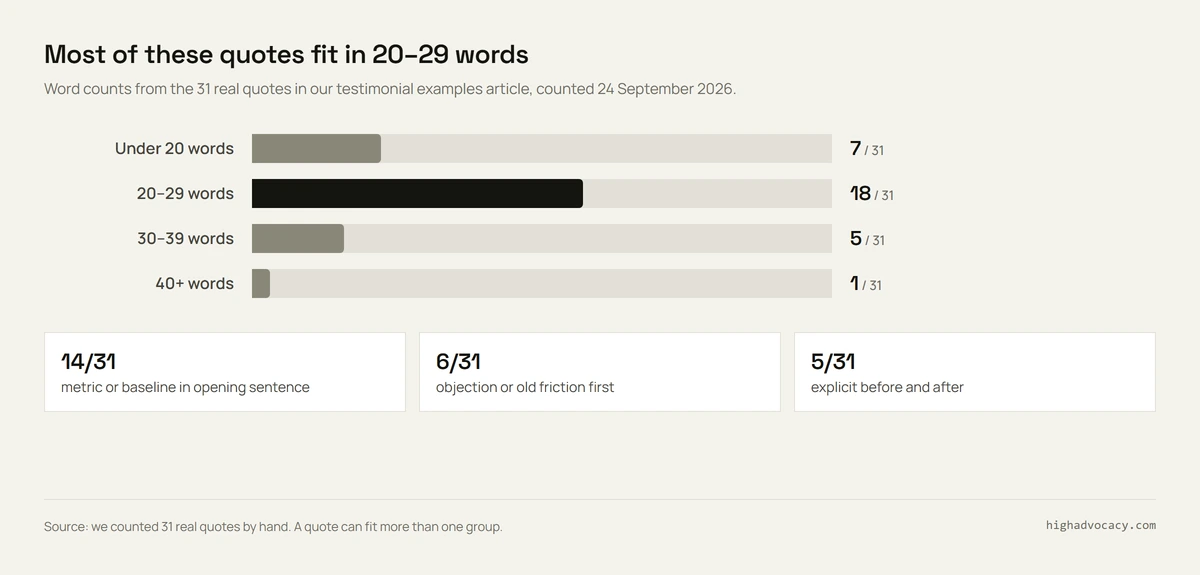
Here's the full count, so you can check the chart. The numbers match the source list.
| # | Company | Words | Number in first sentence | Starts with a worry | Shows before and after |
|---|---|---|---|---|---|
| 1 | Slack | 19 | Yes | No | No |
| 2 | Webflow | 30 | No | No | No |
| 3 | Typeform | 20 | Yes | No | No |
| 4 | Calendly | 27 | Yes | No | No |
| 5 | ClickUp | 24 | Yes | No | No |
| 6 | Salesloft | 12 | Yes | No | No |
| 7 | Chili Piper | 17 | Yes | No | No |
| 8 | lemlist | 22 | Yes | No | Yes |
| 9 | Mixpanel | 40 | No | No | No |
| 10 | Amplitude | 30 | Yes | No | No |
| 11 | Datadog | 26 | Yes | No | No |
| 12 | Miro | 20 | Yes | No | Yes |
| 13 | Notion | 23 | No | Yes | No |
| 14 | HubSpot | 33 | No | No | No |
| 15 | monday.com | 24 | No | Yes | No |
| 16 | Pipedrive | 17 | No | No | No |
| 17 | Figma | 16 | Yes | No | No |
| 18 | Intercom | 35 | No | Yes | Yes |
| 19 | Close | 29 | Yes | No | Yes |
| 20 | Apollo | 23 | No | No | No |
| 21 | PostHog | 28 | No | No | No |
| 22 | Vercel | 28 | No | Yes | No |
| 23 | Gong | 14 | No | No | No |
| 24 | Attio | 18 | No | No | No |
| 25 | Clay | 29 | No | No | No |
| 26 | Zapier | 29 | Yes | Yes | Yes |
| 27 | Airtable | 34 | No | No | No |
| 28 | Asana | 26 | No | No | No |
| 29 | GitLab | 21 | Yes | No | No |
| 30 | Pendo | 24 | No | Yes | No |
| 31 | Loom | 28 | No | No | No |
| Total | All 31 quotes | 7 under 20; 18 at 20–29; 5 at 30–39; 1 at 40 | 14 | 6 | 5 |
The same count, grouped by length:
| Quote length | Quotes | Number in first sentence | Starts with a worry | Shows before and after |
|---|---|---|---|---|
| Under 20 words | 7 | 4 | 0 | 0 |
| 20–29 words | 18 | 9 | 5 | 4 |
| 30–39 words | 5 | 1 | 1 | 1 |
| 40+ words | 1 | 0 | 0 | 0 |
| Total | 31 | 14 | 6 | 5 |
What the count tells you
Short quotes often lean on a number. Four of the seven quotes under 20 words had a number in the first sentence. Pipedrive, Gong and Attio are the three that didn't. Lines like those work best as a quick thumbs-up next to harder evidence. A pricing page or a sales claim usually needs a real result, or a clear picture of the old work.
Length alone tells you little. Of the five quotes between 30 and 39 words, only one had a number up front. Five of the six "starts with a worry" quotes sat in the 20 to 29 word range. The other was Intercom, at 35 words. Zapier was the only quote with both a number up front and an opening worry.
Before-and-after quotes are rare. Just five did it: lemlist, Miro, Intercom, Close and Zapier. Four of them put a number in the first sentence. Intercom opens with setup trouble instead. These quotes show the change, but they don't prove what caused it.
A result alone doesn't show the before. In the examples post, we found 27 of these 31 quotes had a number or a clear result. But only five said what things were like before. So if your case study needs that contrast, ask the customer about the old task. Don't add a starting number yourself.
Few customers name the old tool. Intercom's quote was the only one to name a previous vendor. The others talk about old spending, a move they put off, or work that went away. That's why template 3 lets the customer describe the old workflow instead of naming a competitor.
Three real quotes show these patterns well. Miro's PepsiCo quote gives a launch-time starting point and a result in two sentences. Intercom's Frame.io story starts with setup trouble in the old tool. Zapier's Otter.ai story names the manual work before the fix. We checked all three pages on 24 September 2026. Their exact words live in the examples article. None of the made-up illustrations above use their stories.
Turn a filled-in template into a quote you can publish
Nina's customer sends back two lines. One says the tool is "easy to use". You need one more question before it's ready.
- Vague praise: ask which step got easier.
- A number: ask what it counts, what it started at and over what period. Never add a number the customer didn't give you.
- Ready to publish: keep the final words, the name and the approved pages together in one place.
Approval for a case study may not cover an ad. Reuse a quote only where the customer said yes, and only next to a claim that matches what they lived through.
Stop chasing quotes one email at a time
One quote for one page is fine by hand. But Nina will need a new one for the next launch, and the one after that. Soon the approvals live in five inboxes and nobody knows which quote is cleared for what.
HighAdvocacy's customer advocacy platform is built for this. Here's what it does:
- It asks happy customers at the right moment, like a milestone, a good NPS score or a renewal.
- It gives them an AI-assisted draft, so saying yes takes minutes.
- It collects text and video testimonials, G2, Capterra, Trustpilot and Google reviews, and LinkedIn posts through a widget or a hosted page.
- It imports reviews you already have from 20+ sources.
- Everything goes through one approval queue, then into a library your sales team can search.
- It shows quotes on your site with Walls of Love and widgets.
- You can see the price and start free. Starter is $29/mo, or $24/mo billed yearly.
It doesn't book live reference calls or run a points-based advocate community. If you need those, pair it with a tool built for them. Compare options in our customer testimonial software guide.
Your next step
Pick the one page on your site that most needs a customer voice. For Nina, it was pricing.
Find that page in the table at the top. Copy its template into the short email above, and send it to one happy customer today.
FAQ
What should a client testimonial template include?
Ask for a specific job, what changed and how the customer wants to be named. Include a time frame or number only if the customer can confirm it. See our testimonial questions for more prompts to ask.
Can I use a testimonial template for a website?
Yes. Template 12 collects the quote, the name and the pages it can appear on. Put the card next to the claim it supports.
What goes in a testimonial form template?
Collect the customer's words, role, company, permission and an optional photo. Add one prompt for the page. For a comparison page, ask what made switching worth it.
How is a video testimonial template different?
A video template gives talking points: who they are, the old problem, why they chose you and the result. A written template asks for one short answer.
Should I edit a customer's testimonial?
You can ask the customer to clarify or shorten it. Then they approve the exact words, their name and where it appears. Never publish a made-up example as a real quote.