
Leo runs marketing at a 60-person software company. His favorite customer just said yes to a video testimonial.
The call is on Thursday. Leo has no film crew and no budget. He's worried he'll get 90 seconds of "they're great to work with" and nothing a buyer can use.
You don't need a crew either. You need one good question to answer, a short video call, clear sound, and a release the customer has read.
Quick answer:
- If a customer said yes, book a 5 to 10 minute video call. Send the questions and the setup checklist below with the invite.
- If you want a story you can use, ask what the work looked like before, what changed, and where any number came from.
- Before you publish, get written approval for the name, company, edits and channels. Keep the transcript with the video.
- When it goes on a page, show the speaker's name and role, the runtime, and a transcript. Most vendors we checked skip the last two.
Pick the one buyer question the video should answer
Start with the question a buyer asks you in deals. Then pick a customer whose role and use case fit that question.
Leo's buyers keep asking if their team will really switch. So his video is about switching, not about the product in general.
- Pick one buyer question. For example: switching tools, rolling out to more teams, or proving a result.
- Look for first-hand detail. Find out who was involved, what changed, and which claims the customer can back up.
- Give the customer a choice. A live video call, a recording in their own time, or a written quote.
- Send the topics early. Mark which questions are optional. Ask them to answer in their own words.
- Agree on approvals first. Settle the cut, name, title, logo, captions and channels before you record.
Some stories work better as text. Text is faster to scan and easier to reuse in an email or a slide. It also suits customers who can't appear on camera. Either way, a name, role, timeframe and a real result matter most.
Video wins when a buyer needs context. They can see who is talking and hear how the change felt from the inside. That helps most when the deal is about rollout or getting a team to change habits.
Pair every video with a transcript and one approved quote. For the written side, compare how others credit customers in 31 B2B SaaS testimonial examples, or start from the customer testimonial template. For timing and follow-ups, read how to get customer testimonials.
Video testimonial questions for a five-to-ten-minute call
Tell the customer this is a relaxed chat. Ask one question at a time. When they say something good, ask for an example. Replace the words in brackets with real details.
Remote customer video interview (5–10 minutes)

Thanks for joining. We are recording for [company]. You can skip any question.

1. Please introduce yourself: your role, company, and connection to [workflow].

2. What were you trying to do before a change, and what made it difficult or
   important to solve?

3. What did you evaluate, and what helped your team choose [product]?

4. What changed first after the team started using it? Can you give one example?

5. If you mention a result, what was the baseline, timeframe, and source? What
   can we publish accurately?

6. What concern would you address for a peer considering the same change?

Thanks. Is there anything you want to clarify or leave out before we stop?
Question 5 is the one Leo almost skipped. If the customer says "we saved hours," ask how many, since when, and how they know. Publish only claims the customer agrees are true and OK to share.
Remote video testimonials: recording setup checklist
The customer doesn't need a camera kit. A laptop or phone works if the room is quiet, the camera is steady and the sound is clear. Send this table with the invite.
| Step | What to do | Check before the first question |
|---|---|---|
| Room and light | Pick a quiet room. Face a window or soft light. Keep bright light behind the camera, not behind the speaker. | The face is brighter than the background. Nobody walks through the frame. |
| Camera | Put the laptop or phone on a steady surface at eye level. Frame from mid-chest up, with a little space above the head. | The lens is near eye level. The picture is steady and level, unless you planned a vertical cut. |
| Sound | Use the built-in mic or a headset the customer already knows. Turn off alerts and close noisy apps. | Ask for one full sentence. Listen for echo, crackle or room noise. |
| Recording | Join five minutes early. Agree who starts and stops the recording, and check the layout. | Make a short test recording and check both voices. If you use Zoom, check your account settings and permissions for local recording. |
| Consent and privacy | Confirm the written release. Ask the customer to hide private screens, names or customer data behind them. | What you record and where you'll use it match what they agreed to. |
| Captions and review | Make a transcript, fix names and tech terms, add captions, and send the draft cut for approval. | Captions match the spoken words. The customer approved the final cut. |
Use the recording tool your team already has permission to use. Zoom explains local computer recording. On YouTube, read its help on adding subtitles and captions, and fix the automatic captions before you share.
Testimonial video production: one recording, a cut for each place
Keep the full, clean recording. Then cut a version for each place it will live. These lengths are our starting points, not tested benchmarks.
| Where it goes | Length | What to keep | Put next to it |
|---|---|---|---|
| Homepage | 15–30 seconds | One clear detail and the result or worry that matters most. Start with the customer talking, not a logo animation. | Name, role, company, captions and a link to the full story. |
| Sales deck | 30–60 seconds | One buyer worry, the customer's answer, and enough context to know who they are. | A short source note for any number, and a link to the full video. |
| Case study | 2–3 minutes | The whole story: before, the decision, rollout, result, and one lesson. | Transcript, how any result was measured, and the approved name and company. |
| Social | 15–45 seconds | One idea that still makes sense with the sound off. | Captions, who the customer is, and a link to the full story. |
While you edit, keep a quote log with timecodes. Don't stitch answers into a sentence the customer never said. Save one approved transcript that sales and marketing both use.
Four real customer videos, and what to copy
We opened these vendor pages on 24 September 2026. We quote what the customer says only when the page had a transcript. When it didn't, we describe only what the page showed.
Caspio and Roost: make the old way of working concrete
Roost's Caspio case-study video page has a transcript for Kim Graf, Director of Customer Experience. Graf describes pulling data from Dropbox CSVs, SurveyMonkey and partner spreadsheets. Then she explains how Caspio brought it together for reports to insurance partners. She says, "I'm able to get my work done." The page text shows no runtime.
What to copy: Name the tools and handoffs that made the old process slow. Then show what the customer can do now. A buyer can compare that with their own setup.
Snowflake and Zoom: give the buyer a use case, not a slogan
The Snowflake customer video page for Zoom has a transcript but no runtime in the page text. The transcript names James, an Account Executive at Zoom, and Shweta, whose role isn't given. James describes building a proof of concept with Snowflake Cortex and Streamlit within days. He then used prompts to pull account insights from company data. Shweta talks about governance and security.
What to copy: Keep the technical use case tied to the business reason. The buyer sees why the account team needed it and what limits mattered.
Cloudflare and Padlet: explain the problem before the product
The Padlet customer video page has a transcript for Nitesh Goel, CEO and Founder. Goel explains that building video hosting and delivery in-house would take time. Cloudflare Stream let the team offer video streaming without building it. He says, "We basically flipped it on overnight." The page text shows no runtime.
What to copy: Start with the work the customer wanted to avoid. Then let them describe the change in plain words. The transcript also says the small team saved months of work. That's Padlet's own account on the vendor's page, not an outside measurement.
Workday and La-Z-Boy: use a clear title and a short cut
The La-Z-Boy customer story page lists "A Comfortable Shift to Smarter Work" at 1:26. The same page names Jessie Heath, Director of Global Talent, Culture, and Belonging. We found no transcript in the page text, so we don't quote her here.
What to copy: Tell viewers who is speaking and what the video is about before they press play. A clear title and a runtime help a busy buyer decide to watch.
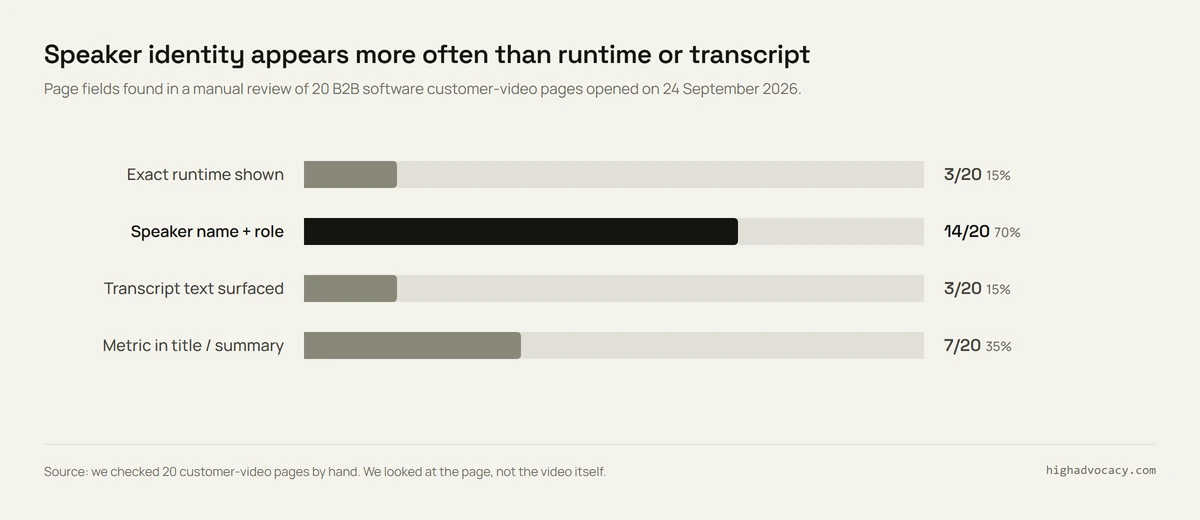
We checked 20 customer video pages. Most hide two things buyers need.
What to do: Put the speaker's name and role next to the player. Show the runtime. Publish a corrected transcript. Lead the title with the result and its timeframe. Then a rep can pick the right story for a deal, and a buyer can judge the number before watching.
How we did this
We wanted to know how software companies present customer videos on their own sites.
On 24 September 2026, we opened one public customer video page for each of 20 B2B software companies. On each page we checked five things:
- Does the page text show the exact video length?
- Does it show at least one customer's name and job title?
- Is there a transcript or caption text on the page?
- Is there a result, like a number, in the title or summary?
- Does the video sit on its own story page or in a video library?
We read the page text only. We didn't test the players' caption buttons or judge video quality. "No" means we didn't find it. It doesn't mean the video lacks it.
| Company / customer | Page | Length shown | Name + title | Transcript | Result in title | Where it sits |
|---|---|---|---|---|---|---|
| Workday / La-Z-Boy | Story | 1:26 | Yes | No | No | Story |
| Cisco / Webex customers | Video | 1:33 | No | No | No | Video page |
| Snowflake / Zoom | Video | Not shown | Yes* | Yes | No | Story |
| Gainsight / Learnship | Story | Not shown | Yes | No | No | Story |
| Caspio / Roost | Video case | Not shown | Yes | Yes | No | Story |
| Impartner / BeyondTrust | Video (gallery) | 5:38 | Yes | No | Yes | Story |
| AssemblyAI / Siro | Story | Not shown | Yes | No | Yes | Story |
| Cloudflare / Padlet | Video | Not shown | Yes | Yes | No | Story |
| WorkFlex / Telenor | Case | Not shown | Yes | No | Yes | Story |
| Island / Patrianna | Story | Not shown | No | No | Yes | Story |
| Unit4 / SQLI | Story | Short* | Yes | No | No | Story |
| Apteco / New Look | Story | Not shown | Yes | No | No | Story |
| Palo Alto Networks / customer cases | Video library | Not shown | No | No | No | Library |
| Oracle / regional cloud customers | Video hub | Not shown | No | No | No | Library |
| SAP / Online Metals | CRM story hub | Not shown | No | No | Yes | Library |
| Zendesk / Thermomix | Video | Not shown | Yes | No | Yes | Story |
| Okta / Takeda | Story | Not shown | No | No | No | Story |
| Smartsheet / Colliers | Video story | Not shown | Yes | No | Yes | Story |
| Braze / Mindvalley | Video | Not shown | Yes | No | No | Story |
| Adobe / Havas POP | Story | Not shown | Yes | No | No | Story |
Key: Yes* = one speaker has a name and title, another speaker's title isn't given. Short* = the page calls the video short but gives no exact length. Story = a single customer story or testimonial page. Video page = a single video page. Library = a vendor's video or resource library. Transcript = text on the page, not captions inside the player.
What surprised us: Most companies credit the customer well. 14 of 20 pages put a name and job title near the video. But almost nobody tells the buyer what they're about to watch.
Only 3 pages showed the video's length: Workday's 1:26, Cisco's 1:33 and Impartner's 5:38. Only 3 had a transcript. On 17 pages, a buyer can't see how long the video is or skim what the customer says without pressing play.
Seven pages put a result in the title or summary. WorkFlex and Telenor put €1 million in the headline. Zendesk's Thermomix page claims 63% on first response time. Smartsheet's Colliers page says six months went down to one week. Those are the vendors' own claims. The other 13 pages may still show results further down the story.
Mistakes to avoid
- Letting the call wander. Without one buyer question to aim at, you get vague praise, not something a buyer can use. Pick the question first, then the customer.
- Publishing a number nobody checked. "We saved hours" isn't publishable on its own. Get the baseline, the timeframe and the source first.
- Stitching a quote that was never said. Cut for length, not for a better line. Keep the quote log with timecodes so you know what's real.
- Leaving off the runtime and the transcript. Most of the pages we checked skip both, so a buyer can't judge the story before pressing play.
Getting the yes is the hard part, so ask at the right moment
Think back to Leo. His call went well because the customer said yes in the first place. Most teams never get that far. They ask at a random time, the customer is busy, and the request dies in an inbox.
That's the job HighAdvocacy does well:
- It asks happy customers at the right moment: a milestone, a good NPS score, a renewal.
- It gives them an AI-assisted draft, so saying yes takes minutes.
- It's video testimonial software that also collects text testimonials through a widget or a hosted page, plus G2, Capterra, Trustpilot and Google reviews and LinkedIn posts.
- Everything goes through one approval queue. Approved videos and quotes land in a Proof Library your sales team can search, and on Walls of Love and widgets on your site.
- You can see the price and start free. Starter is $29/mo, or $24/mo billed yearly.
It doesn't book live reference calls between customers and prospects. If you need that too, pair it with a reference tool.
Consent, releases and rewards
Get written permission before you record. The release should cover the speaker's name, job title, company, logo, edits, channels and any paid ads. Agree on how the customer reviews edits. Keep the approved transcript and final cut with the release.
Only publish claims the customer can back up. If you give anything of value for a testimonial, say so where it appears. The FTC's endorsement guidance says endorsements should reflect honest experience, and material connections may need clear disclosure. Rewarded reviews have extra limits. See the FTC's Rule Q&A and our guide to FTC guidelines for incentivized reviews. Have a lawyer check your release and reward terms.
Your next step
Pick the one question buyers ask most in your deals. Then find two customers who could answer it from experience.
Send each of them the interview questions and the setup checklist above. Book 10 minutes. When the video is live, check your page against the four fixes: name and title, length, transcript, and a result in the title.
FAQ: video testimonials
How long should a video testimonial be?
Match it to where it lives: 15–30 seconds on a homepage, up to 2–3 minutes in a case study. In between, try 30–60 seconds in a sales deck and 15–45 seconds on social. Keep the full interview, then cut a version for each place. These are starting points, not benchmarks.
What questions should I ask in a video testimonial?
Ask about their role, how things worked before, why they changed, the first result and advice for a peer. Use the copyable video testimonial questions above. For written quotes, see our testimonial questions.
How do you record remote video testimonials?
Book a short call and send the checklist. Test sound and framing, record with permission, then review the transcript. A steady phone or laptop is often enough.
Are video testimonials better than written testimonials?
Video helps when the speaker's voice and role add context. Text is easier to scan and approve. Use both when the customer agrees.
What are the benefits of video testimonials for SaaS?
They show the human side of the decision, the rollout and the result. A relevant story and a clear name matter more than how good someone looks on camera.