
A prospect asks to speak with a customer in their region who switched from the same competitor. You need a relevant person, their permission and someone who owns the introduction.
Customer reference software helps sales and customer marketing find willing customers for these requests, coordinate approvals, record past asks and track what happened. Some tools also schedule the call. A searchable library serves a different part of the job: giving a rep an approved review, quote or video they can send now.
Choose by the request you need to fulfill:
- Live calls keep waiting on matching or permission: Compare the seven reference-workflow vendors below using the same deal request.
- Requests are occasional and one person can manage them: Start with a spreadsheet or CRM fields and an activity log.
- Reps need reviews, testimonials and videos to send today: HighAdvocacy collects them into an approved library, with self-serve plans from $0.
Use the comparison to choose a shortlist, then copy the evaluation sheet below. It covers the awkward handoffs a feature checklist leaves out.
Compare the eight tools
Pick the row that matches your workflow. We revisited primary product and integration sources on 19 October 2026; the older research snapshot is preserved separately below. "No amount on pages checked" means a sales/demo conversation is needed to establish the price, not that we know its contract cost. These are public-page checks, not account tests.
| Tool | What it's for | How reps ask for a reference | CRM links | Price check (19 Oct 2026) | Best for · check this |
|---|---|---|---|---|---|
| UserEvidence | Customer evidence plus reference management | Ask from a Salesforce deal or Slack. Matching, approval options and scheduling are described. | Salesforce and HubSpot; request from a Salesforce deal. | No amount on pages checked | Busy sales teams where one owner runs stories and calls. Confirm what the package includes. |
| Deeto | Customer voice and reference calls | Describes willingness, preferences, matching context and fatigue. Confirm calendar handling. CRM activity can start a request. | Salesforce and HubSpot named. | No amount on pages checked | Teams running a wider customer-voice program. Check the exact CRM flow. |
| ReferenceEdge by Point of Reference | Advocacy work inside Salesforce | Requests start in Salesforce or Slack. Routing and use limits sit on advocate profiles. | Built into Salesforce. Other integrations listed, not HubSpot. | Quote; per-user basis in vendor FAQ | Formal programs or Salesforce-heavy teams. Budget for admin and setup. |
| Upland RO Innovation | Enterprise references and sales content | Reps request contacts and content in the tool or CRM. Activity tracking guards against overuse. | CRM opportunity access described; confirm your CRM. | No amount on pages checked | Formal programs with a reference team. Confirm how requests and call booking work today. |
| Influitive | Advocate community with references | A Salesforce deal request becomes an advocate challenge. Its Salesforce app covers matching and scheduling. | Salesforce. No HubSpot reference flow on the pages we read. | Contact sales | Formal programs that also want a community. Confirm Salesforce package scope. |
| SlapFive | Reference automation and customer stories | Salesforce or Slack intake, approval by a trusted contact, outreach, scheduling and delivery. | Salesforce app; HubSpot docs describe reference-request creation. | No amount on pages checked | Teams where approval and revenue tracking matter. Check which tier has your flow. |
| Champion | Reference matching plus customer revenue programs | Reps ask in Salesforce. AI ranks the best customers, with scheduling and history. | Salesforce; HubSpot sync announced. | No amount on pages checked | Teams that want matching and champion tracking together. Check approval controls. |
| HighAdvocacy | Collects reviews, testimonials and social posts, then makes them easy for sales to find | Reps search approved reviews, quotes and videos in one library. No live-call booking. | REST API, Zapier and n8n on the pricing page. No native reference-request flow established by those listings. | Forever Free; Starter $24/mo billed yearly ($29 monthly); Professional $79/mo billed yearly ($99 monthly) | Teams whose reps need customer stories today. For live calls, add a tool above. |
What our public-page checks can tell you
The September snapshot
We wanted to know whether a rep could move from a deal request to a willing customer and a booked call.
On 25 September 2026, we opened the product, integration, help and pricing pages for eight tools. For each one we checked seven things:
- Whether there's a public price.
- Whether you can sign up yourself, on a stated plan.
- Whether it connects to Salesforce.
- Whether it connects to HubSpot.
- Whether a rep can start a request inside a CRM deal. (A plain data sync doesn't count.)
- Whether it tracks how often each customer gets asked.
- Whether it books the call.
We marked "Yes" only when a page said so. We didn't buy accounts or test the tools. "Not listed" means we didn't find it. It doesn't mean the tool can't do it. One of the eight is ours: we built HighAdvocacy, so weigh that, and we checked it against the same seven things as everyone else. Its raw result is in the table below.
| Tool and source | Public price | Sign up yourself | Salesforce | HubSpot | Request from CRM deal | Tracks overuse | Books the call |
|---|---|---|---|---|---|---|---|
| UserEvidence · integrations | Not listed | Not listed | Yes | Yes | Yes | Yes | Yes |
| Deeto · integrations · call booking | Not listed | Not listed | Yes | Yes | Yes | Yes | Yes |
| ReferenceEdge · product overview | Not listed | Not listed | Yes | Not listed | Yes | Yes | Not listed |
| Upland RO Innovation | Not listed | Not listed | Yes | Not listed | Yes | Yes | Not listed |
| Influitive · Salesforce app | Not listed | Not listed | Yes | Not listed | Yes | Not listed | Yes |
| SlapFive | Not listed | Not listed | Yes | Yes | Yes | Yes | Yes |
| Champion · HubSpot release · advocacy history | Not listed | Not listed | Yes | Yes | Yes | Yes | Yes |
| HighAdvocacy | Yes | Yes | Not listed | Not listed | Not listed | Not listed | Not listed |
| Tools that list it (of 8) | 1 | 1 | 7 | 4 | 7 | 6 | 5 |
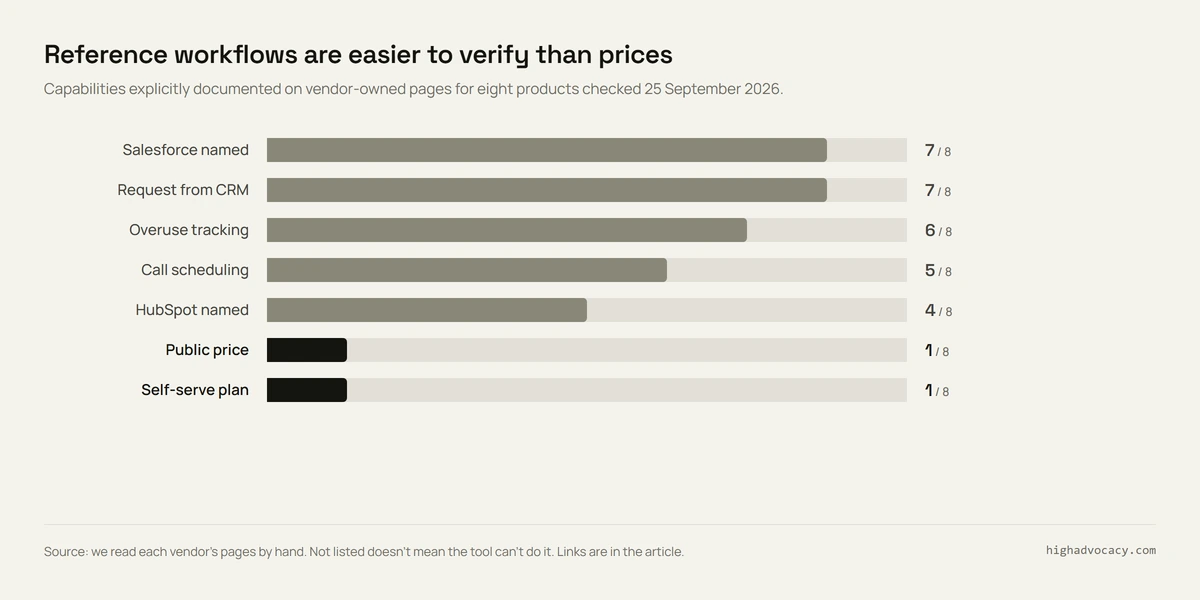
In that September check, seven of the eight listed Salesforce and CRM-deal requests, four named HubSpot, and one showed a self-serve price. The table and chart describe what those pages stated then. They do not show that we successfully completed a request in each product, or that every capability is included in an entry package.
What we checked again in October
We reopened the vendors' primary pages on 19 October 2026 to ask a narrower question: what would a rep still need to see before relying on this workflow? We separated a published statement from behavior that needs a demo. We did not sign into vendor accounts, submit customer data or time a live reference request. We make HighAdvocacy and applied the same distinction to our own product.
| Public evidence we found | What to check in a demo |
|---|---|
| UserEvidence describes Salesforce/Slack requests, approval options, automated coordination and burnout scores. Its HubSpot integration lists sync of reference activity. | Start a request on your HubSpot deal if that is where reps work. A sync statement alone does not establish that intake path. |
| Deeto describes willingness, preferences, availability and fatigue. Its integration page describes CRM-triggered reference requests. | Show whose permission is needed for this particular call, who asks the customer and what happens after they decline. |
| ReferenceEdge describes Salesforce-native requests, use limits, profile updates and data import/export. | Try a request at the customer's limit. Show the block or warning, the override owner and the exported history. |
| Upland's solution overview describes reference contacts, content, CRM access and activity tracking. It is an older document. | Ask for the current workflow and package in writing, including the CRM you use, consent steps and booking owner. |
| Influitive describes reference management with advocacy. Its Salesforce announcement and installation guide provide more context. | Show the current request, customer acceptance and calendar flow in the package being quoted. An older announcement is not a current contract. |
| SlapFive describes Trusted Contact approval, outreach, scheduling and fulfillment in Salesforce. Its HubSpot docs explicitly describe creating reference requests. | Run the required HubSpot steps, show where configuration is needed and identify who maintains it. |
| Champion's scheduling release describes collecting availability, prospect confirmation and progress tracking. Its HubSpot release describes data sync. | Show rep intake, permission and rescheduling in your CRM; distinguish the HubSpot flow from the Salesforce flow. |
| HighAdvocacy has collection, approval, rewards and a searchable Proof Library. | Try collecting and retrieving a relevant asset. Automatic matching into a live deal is in build; live-call booking is not offered. |
The handoffs the feature counts miss
A CRM logo leaves the intake question open. The SlapFive HubSpot documentation names reference-request creation; UserEvidence's integration page describes reference-activity sync. Both are useful, but they answer different questions. Write the exact action your rep needs beside the integration name, then ask the vendor to perform it. "HubSpot supported" is too broad to settle the decision.
A willing advocate still needs a choice about the next ask. Deeto's public page explicitly discusses willingness and boundaries. UserEvidence offers approval options, while SlapFive names a Trusted Contact approval step. Those statements do not establish identical consent controls. In the demo, have the relationship owner approve and the customer decline. Check that a decline closes that request and does not trigger another invitation through a different route.
Usage history and request limits need separate checks. The September table records six vendors describing overuse tracking. Tracking can help an owner make a decision; it does not prove the software blocks another ask. ReferenceEdge names use limits, and UserEvidence describes reducing match priority after recent activity. Ask what each actually does when an otherwise suitable customer is busy. Record whether it warns, blocks or needs a person's judgment.
Scheduling has an owner even when it is automated. Champion describes gathering availability and asking the prospect to confirm a time. SlapFive describes scheduling within a broader fulfillment flow. Ask who sees an unanswered invitation, changes a deadline and follows up after a no-show. A calendar invitation is only one step toward a completed reference conversation.
Keep these findings beside your shortlist. They come from reading this selected set of public pages, not a market-wide survey or measured product comparison. They help decide what to verify; they do not rank vendors by quality, predict faster sales or prove a feature is absent when we did not find it.
When to buy customer reference management software
Don't buy too early. A good list covers the first two rows below.
| Your situation | Start with | Move up when |
|---|---|---|
| A request now and then. One person knows which customers will help. | A spreadsheet with consent, region, use case, owner and last ask | Reps keep waiting for someone to remember a name. |
| A few open deals ask "who else uses you?" at the same time. | CRM fields, one request owner and an activity log | Matching, approval and booking still take days, or the same customer gets asked too often. |
| Many reps, regions or approvers, and requests every week. | Dedicated reference software | Before you sign, demo the full path from deal to booked call. |
Our customer reference library guide covers the fields for the first two rows. Record consent and match details before any demo. The vendor needs both to show you a real match.
When a review or customer story answers the request
Ask the rep what the prospect needs to learn. A question about a specific implementation may need a live peer. A question about whether similar companies use the product may be answered with an approved review, quote or video. Let the prospect choose whether that is enough.
HighAdvocacy collects reviews, testimonials and social posts through campaigns, routes submissions through an approval queue, supports rewards, and stores reusable assets in its Proof Library, tied to customer advocate records. Your team still owns eligibility, permission to reuse material and the distribution process. Your team can search the library for relevant material and send it to the rep, which covers the sales enablement half of the job.
Its published pricing, checked 19 October 2026, lists Forever Free, Starter at $29 monthly or $24 per month billed yearly, and Professional at $99 monthly or $79 per month billed yearly. Check current plan limits before buying.
For a live-call workflow alongside that library, evaluate the reference vendors above. For broader community and review programs, see our customer advocacy platform comparison.
Copy this vendor evaluation scorecard
Give each vendor the same anonymized deal request. Include the buyer's role, region, use case, question to answer and deadline. Use a test contact, not a real customer, until the appropriate owners approve the test.
Record Public evidence when a dated source describes the behavior. Record Demo needed when it remains unresolved. After the demo, replace that status with what you saw and its limits. Do not turn the number of boxes filled in into a vendor rating: a missing must-have can matter more than several optional features.
Customer reference software evaluation
Vendor / package:
Reviewed by / date:
Our CRM and rep's starting screen:
Anonymized deal request / deadline:

For every check, record:
Status: Public evidence | Demo needed | Observed in demo
Source URL and date, or demo steps:
Included package / configuration / owner:
Unresolved question:

1. Request intake
Start from our deal. Carry role, region, use case and deadline.
Show which fields the rep must retype.

2. Match relevance
Show why each customer fits and which details are missing.
Try a request with no suitable willing customer.

3. Permission
Show activity preferences and approval for this request.
Have the relationship owner and customer decline in turn.
Record what stops and where the decision is stored.

4. Request limits and fatigue
Show recent and open asks, including other advocacy activities.
Attempt another request at the customer's stated limit.
Record warning/block behavior and who can override it.

5. Scheduling ownership
Offer times, decline, reschedule and miss a test call.
Name the person responsible for each unresolved state.

6. CRM writeback
Show requested, approved, declined, booked and completed states.
Check their timestamps and owner on the original deal.
Disconnect or fail the sync; show the recovery process.

7. Exports and access
Export a test contact, permission record and request history.
Check whether timestamps and deal links survive.
Show who can see contact details and change permission.

8. Quote and decision
Record seats, modules, CRM package, setup and ongoing work.
Confirm renewal terms and exit/export arrangements.
Must-have gaps / next owner / next action:
After each demo, ask the rep and relationship owner to read the same record. If either cannot tell who owns the next action, leave that question open. Ask for a written answer tied to the quoted package before purchasing.
Our customer reference library guide gives you a starting field list if a spreadsheet or CRM process is enough. Keep that process while evaluating tools so a purchase does not become a prerequisite for answering today's request.
Your next step
Open your CRM and review the last 10 times a rep asked for a customer. Ten is a suggested review exercise, not a benchmark. Note which requests needed a live call, which could use an existing story, where permission was recorded and who owned the next action.
If most needed a live call, book demos with two tools from the table and use the questions above. If most just needed a story, start HighAdvocacy free and build the library first.
FAQ
What is customer reference software?
It helps you find the right customer for a prospect, handle the request and approval, and track how often each customer is asked. Check whether scheduling is included and who handles unanswered requests. A library of quotes and case studies helps reps share existing material; live calls need consent and coordination too.
Can Salesforce or HubSpot handle references without a dedicated tool?
Yes, for a small program. Add fields for willingness, match details, owner, last activity and consent, and give every request one owner. Buy a tool when that can't keep up with live deals, approvals or tired customers.
How much does customer reference software cost?
Most reference vendors in our shortlist require a quote on the pages checked. Ask for the full package, including CRM access, seats, setup and scheduling. HighAdvocacy's public prices are listed above for the collection-and-library job; they are not the price of a live-call management service.