
Copy a review request email template below, then check the rule that decides who receives it. Asking for an honest review means little if your campaign reaches only customers who already said they were happy.
Start with the direct ask, or adapt a message with the review request email generator. Each template has a copy button. Use the campaign worksheet before handing the campaign to support or customer success.
Pick a template for the message you need
| Your situation | Templates to use |
|---|---|
| Product use or no recent event | 1. Verified milestone; 5. Direct ask as fallback |
| Survey, support or account checkpoint | 2, 3 or 4, without satisfaction filters |
| A campaign or personal invitation | 6. Campaign; 7. Approved incentive; 8. Executive |
| An earlier invitation or published review | 9. Reminder; 10. Reuse permission |
Ten review request email templates
Replace each bracketed field with a verified fact and the destination's own review link. The customer writes the review on the review platform. These messages request participation; they do not supply review wording or a preferred rating.
1. The product-context ask
Best for: A consistent invitation point after genuine product use, with a relevant milestone mentioned when one exists.
A verified product milestone
Subject: You reached [verified milestone] in [Product]
Hi [First Name],
Your team reached [verified milestone] in [Product]. We would like to invite you to share an honest review on [review site].
[Leave a review]
Your own experience will help another team decide whether to try it.
Thanks either way,
[Your Name]
Replace every [bracketed] field before sending.
Use the milestone only as verified personalization within your broad invitation campaign. Send template 5 to eligible users without that milestone.
2. The survey-context invitation
Best for: A regular invitation campaign that happens near a feedback survey, without using scores or survey participation to select recipients.
Around a feedback survey
Subject: An invitation to review [Product]
Hi [First Name],
We are inviting customers to share their experience with [Product] on [review site]. You are welcome to take part whether or not you answered our recent survey.
[Review link]
Please write in your own words. Taking part is optional.
Thank you,
[Your Name]
Replace every [bracketed] field before sending.
3. The support-context ask
Best for: A neutral invitation process where a recent support conversation is relevant background, rather than proof the customer is satisfied.
After a support conversation
Subject: Your experience with [Product]
Hi [First Name],
We recently spoke about [issue or question]. If you would like to share your experience with [Product], you can leave a review on [review site].
[Leave a review]
Your decision to review will not affect the support you receive.
Best,
[Support teammate]
Replace every [bracketed] field before sending.
Keep service handling separate. An unresolved issue must not selectively delay the invitation while happy customers receive theirs.
4. The account-checkpoint ask
Best for: A regular account checkpoint that includes eligible customers regardless of whether they renewed, expanded or decided to leave.
At an account checkpoint
Subject: Would you review your time with [Product]?
Hi [First Name],
As we reach [account checkpoint], we are inviting customers to review their experience with [Product].
If you would like to take part, the link is here: [Review link]
Thank you for considering it,
[Your Name]
Replace every [bracketed] field before sending.
5. The direct ask
Best for: A real user who meets your invitation rule, with no recent conversation to mention.
The direct ask
Subject: Would you share your experience with [Product]?
Hi [First Name],
You have used [Product] for [use case or period]. Would you share an honest review on [review site]?
[Review link]
No pressure if now is not a good time.
Best,
[Your Name]
Replace every [bracketed] field before sending.
6. The campaign invitation
Best for: A review campaign whose purpose you can explain without requesting a target rating.
The campaign invitation
Subject: Help another [role] evaluate [Product]
Hi [First Name],
We are inviting customers to share honest feedback about [Product] on [review site]. Your experience could help another [role] deciding whether to use it.
[Review link]
Thank you,
[Your Name]
Replace every [bracketed] field before sending.
7. The approved-incentive starting point
Best for: An incentive campaign the destination has approved. This is a starting body, not a complete platform-approved invitation.
Approved incentive starting point
Subject: An invitation to review [Product]
Hi [First Name],
Please share an honest review of [Product] on [review site]. [Approved incentive terms, eligibility and disclosure.]
The offer does not depend on a positive rating.
[Approved campaign review link]
Thank you,
[Your Name]
Replace every [bracketed] field before sending.
Supply the actual campaign terms before use. For Capterra, use its Vendor Portal incentive link and required disclosures and footer from the Reviews Collection Program rules. This body does not replace that process. Trustpilot prohibits review incentives. For G2, confirm the permitted campaign and disclose independently provided incentives to G2. Our FTC incentive-review guide provides disclosure background; current primary policies below take precedence over older invitation and incentive advice in linked guides.
8. The executive ask
Best for: An executive who knows the customer and can truthfully name the relationship.
From an executive
Subject: A request from [executive name]
Hi [First Name],
We spoke about [verified topic or use case]. I wanted to invite you to share your experience with [Product] on [review site].
[Review link]
Thank you for considering it,
[Executive name]
Replace every [bracketed] field before sending.
9. The single follow-up
Best for: A delivered invitation where the customer has not declined, unsubscribed or already submitted a review.
One follow-up
Subject: Re: [original subject]
Hi [First Name],
Following up on my invitation to review [Product]. If you would like to take part, the link is here: [Review link]
If now is not a good time, no reply is needed. I will not keep following up about this request.
Best,
[Your Name]
Replace every [bracketed] field before sending.
A click cannot confirm submission. Reconcile known reviews and replies before reminding; leave unobserved status as unknown. When you automate review collection, make those stop conditions explicit. One reminder is our editorial choice, not a measured best-performing cadence.
10. The thank-you and reuse-permission ask
Best for: A customer who has already reviewed the product, when you want to publish their words somewhere else.
Permission to reuse a review
Subject: Permission to share your review
Hi [First Name],
Thank you for sharing your review. May we quote it on [specific page or asset] with [name and company details]?
We will keep the wording unchanged unless you approve an edit. You can say no, request a change, or limit where it appears.
[Approve reuse] [No thanks]
Thank you,
[Your Name]
Replace every [bracketed] field before sending.
Store the exact quote, approved use and attribution limits, and check platform display terms. For a new written testimonial, use our testimonial questions and testimonial template guides.
Check who your sending rule leaves out
On 23 October 2026, we checked all ten messages in our earlier guide. Four suggested choosing customers by a successful milestone, positive survey feedback, a support win or renewal. We translated those suggestions into simple list conditions and ran an offline check with invented records. These are illustrative translations of the wording, not queries from a historical CRM campaign.
We gave eight fictional users different survey, support and account states. Each had genuine product experience, had reached the same invitation checkpoint, could be contacted and had no known submitted review. We then applied each extra filter separately. The neutral checkpoint rule used only those shared eligibility and stop conditions.
| Fictional user's situation | Positive score only | Satisfied support only | Renewed only | Success milestone only | Neutral checkpoint |
|---|---|---|---|---|---|
| A. Positive score, satisfied support, renewed, milestone | Invite | Invite | Invite | Invite | Invite |
| B. Low score, open ticket, cancelled, no milestone | Exclude | Exclude | Exclude | Exclude | Invite |
| C. No survey, satisfied support, trial user, no milestone | Exclude | Invite | Exclude | Exclude | Invite |
| D. Neutral score, satisfied support, cancelled, milestone | Exclude | Invite | Exclude | Invite | Invite |
| E. Positive score, open ticket, renewed, no milestone | Invite | Exclude | Invite | Exclude | Invite |
| F. Low score, unhappy support, renewed, no milestone | Exclude | Exclude | Invite | Exclude | Invite |
| G. No survey, no support conversation, renewed, milestone | Exclude | Exclude | Invite | Invite | Invite |
| H. No survey, unhappy support, cancelled, no milestone | Exclude | Exclude | Exclude | Exclude | Invite |
To repeat this check, create the situations above as test records. For the positive-score condition, we used NPS 9 or 10; neutral was 7 and low scores were 2 or 3. The support condition required recorded satisfaction. The renewal and milestone conditions each required their named event. All four included the shared eligibility rule first. Use these declared assumptions when reproducing the table, rather than guessing what a column means.
Record C shows why removing a positive-score threshold is not enough if your list still requires a survey response. It had no score at all. Record G shows a different blind spot: requiring a support interaction excludes users who never needed support. Neither absence tells you whether someone can describe their product experience.
We then counted what would happen if four teams each used one filtered list and sent independently. The lists contained 12 rule matches across six distinct fictional users. Record A appeared in all four lists, while records B and H appeared in none. Those are counts from this declared fixture, not estimates of what happens in customer campaigns.
Deduplicating those lists would remove repeated invitations but still leave B and H outside the audience. Adding invitation totals would hide both problems. For your own handoff, compare distinct eligible users with distinct invited users, then inspect the unmatched records. Give the sending tool one audience and one owner so separate success, support and marketing automations cannot each invite the same person for the same experience.
The shared list still needs relevant personalization. Record A can receive the verified milestone opening; record B needs the ordinary direct ask. Both enter through the same invitation decision. Changing the wording inside that shared campaign preserves context without making a successful milestone the only door into it.
Record D passes the satisfied-support and milestone checks despite cancelling. Record F passes the renewal check despite a low score and unhappy support. These combinations show why account state, service state and sentiment should remain separate fields. Do not let a renewal label stand in for a customer's opinion, or a support reply stand in for their whole product experience.
We also ran two stop-condition controls using record A's otherwise positive details. One was unsubscribed; the other had already submitted a review. Every rule excluded both. Those exclusions prevent unwanted or duplicate contact and should survive the removal of sentiment filters. Your own destination may have additional eligibility requirements; confirm those before creating the real audience.
This exercise checks list logic only. It is not a customer study, campaign result, product test or platform approval. There is no published response rate here for the same reason: we have not measured one against a dated sample, and an invented rate would only set you up to miss it.
Check the destination's rules
We checked these primary sources on 23 October 2026. Recheck before launching; this summary cannot establish whether your whole campaign meets every applicable rule.
| Destination | Recipient selection | Incentives and writing |
|---|---|---|
| G2 Community Guidelines | Do not exclude potentially negative reviewers or target only positive reviews | Do not tie rewards to positive sentiment; disclose independently offered incentives to G2 |
| Capterra Community Guidelines | Request reviews across users without selection by expected sentiment or prior feedback | Do not coach review content; incentive outreach must follow its approved program, link and disclosures |
| Trustpilot September 2026 guidelines | Invite consistently at the same journey point; do not choose a stage reached only after good experiences | Use neutral language and no review incentives |
The FTC guidance for marketers also directs businesses to check destination policies and avoid biased solicitation. The February 2026 Trustpilot guidelines remain linked as the earlier version this article used; the current check above uses September 2026.
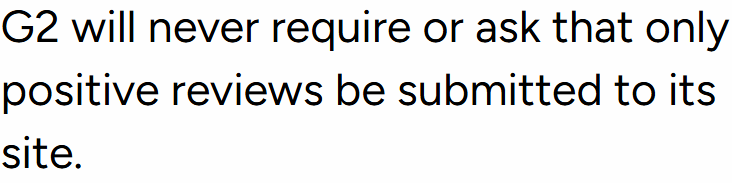
G2's review-context guidance accepts honest opinions rather than requiring positive reviews. Source: G2 Community Guidelines, captured 23 October 2026.

This example appears in Trustpilot's list of invitation practices businesses must avoid. Source: September 2026 business guidelines, captured 23 October 2026.
G2's review validity guidance and Capterra's review verification explanation describe their review processes. Submission, acceptance and publication are separate events; your email tool may not observe all of them.
Build your send rule before you schedule
Copy this worksheet into your campaign brief to make the changes from our audit checkable. Keep it with the audience export, not in the email your customer receives.
Destination and campaign link:
Who has a genuine experience and is eligible here:
Invitation point applied consistently:
Audience filters, including any score/renewal/support conditions:
Excluded recipients and the reason for each exclusion:
Verified personalization field, or plain fallback:
Reward terms and approved process, or none:
Invitation owner:
Reminder owner and planned final reminder:
Known events that stop messages:
How submission/publication status will be checked:
Quote reuse requested separately, with the exact approved use:
Track sent, delivered, clicked, submitted, accepted and published only when observable, with the reporting period. The customer advocacy KPI guide explains the wider funnel. Use the G2 reviews guide for account setup; follow the current primary policies above for recipient selection.
Choose the workflow and send
Use how to identify customer advocates for voluntary references or stories, without making advocates your only public-review audience.
The Reviewflowz campaign page, Trustmary collection pages and Senja pricing page show collection and display options. We reopened them; we did not run feature tests or compare prices.
Use our Trustpilot vs G2 vs LinkedIn comparison for profiles and features; apply current primary policies above to invitations and incentives. Compare workflows in our customer advocacy platform comparison. Skip stale lists and recipients without genuine experience.
HighAdvocacy combines collection, submission approval and reusable customer material. See the customer advocacy platform and how HighAdvocacy works, or sign up. Before sending, verify the recipient rule and stop conditions.